Building an AI-Powered Hiring Platform with Google ADK and Gemini (Part 1)
If you've ever used an Applicant Tracking System (ATS), you know the pain. You are paying anywhere from $5K to $50K a year for what is essentially a rigid, glorified spreadsheet. Recruiters are forced to juggle 5–7 different tools just to move a candidate from "Applied" to "Hired," and the whole process is agonizingly slow.
I got tired of it. So I decided to build a better way: An open-source, multi-agent AI Hiring Assistant that automates the entire recruitment lifecycle through a single conversational interface.
In this tutorial (Part 1 of the series), I'll walk you through the core architecture, the database design, and how I built the JD Agent to automatically generate unbiased job descriptions using Google ADK and Gemini 2.5 Flash.
🏗️ The Architecture & Tech Stack
When building an AI agent system, the framework and database choices are critical. Here is the stack I chose and why:
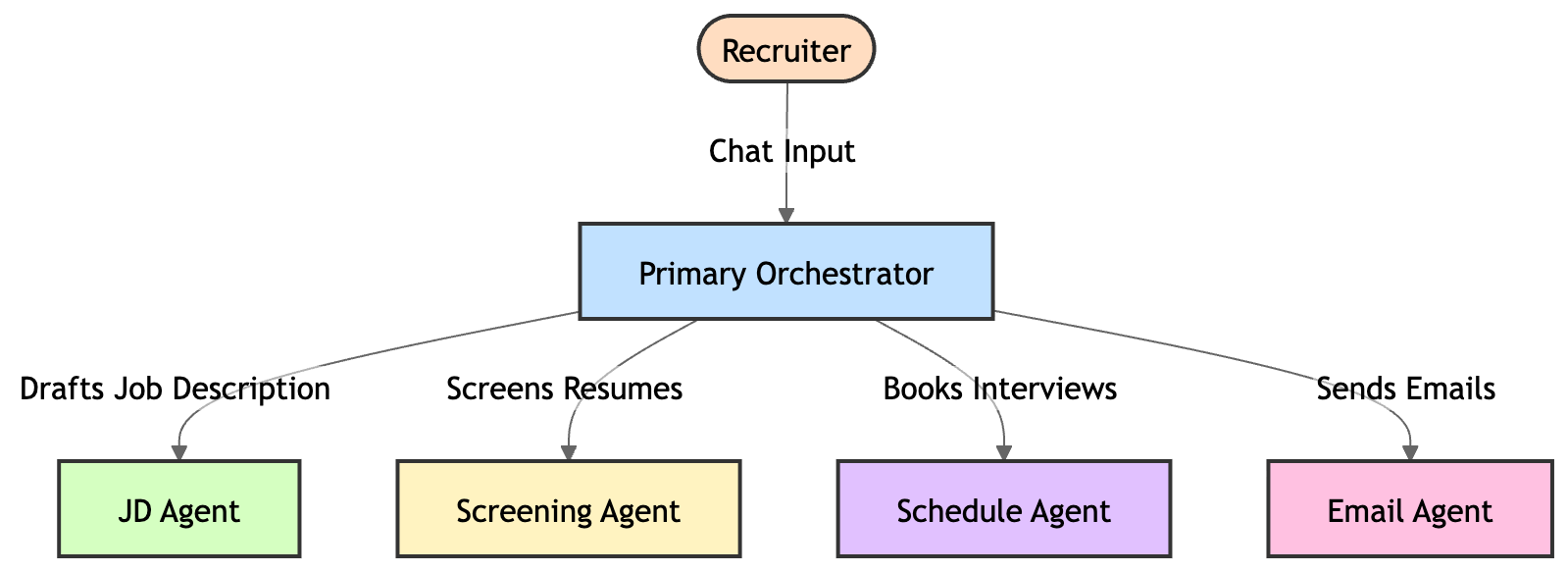
- Google ADK (Agent Development Kit): Instead of one massive, confusing LLM prompt, I used ADK's "hub and spoke" model. A Primary Orchestrator agent understands the user's intent and routes it to specialized sub-agents (like the JD Agent, Scheduling Agent, or Email Agent).
- Gemini 2.5 Flash: Speed matters in conversational UIs. Flash gives us incredible reasoning capabilities with near-instant response times.
- AlloyDB (PostgreSQL): I chose AlloyDB over NoSQL solutions like Firestore because hiring data is inherently relational (Candidates belong to Jobs, Communications belong to Candidates). Plus, AlloyDB's native
pgvectorsupport means we can do semantic resume matching right in the database without needing a separate vector store. - FastAPI & Cloud Run: A lightning-fast Python backend deployed as a serverless container.
Here is what the agent hierarchy looks like:
🗄️ Step 1: Designing the AlloyDB Schema
We start by defining our relational schema. To let the AI generate and store job descriptions, we need a robust jobs table.
Notice how we aren't just storing the text—we are storing structured arrays (requirements) and dedicated fields for our future Bias Detection agent (bias_flags, bias_score).
CREATE TABLE IF NOT EXISTS jobs (
    job_id        UUID PRIMARY KEY DEFAULT gen_random_uuid(),
    title         VARCHAR(255) NOT NULL,
    description   TEXT,
    requirements  TEXT[],
    status        VARCHAR(50) DEFAULT 'open',
    bias_score    SMALLINT NOT NULL DEFAULT 0,
    bias_detected BOOLEAN NOT NULL DEFAULT FALSE,
    bias_flags    JSONB NOT NULL DEFAULT '[]'::jsonb,
    created_at    TIMESTAMP WITH TIME ZONE DEFAULT NOW()
);
🤖 Step 2: Building the Multi-Agent Orchestrator
With Google ADK, setting up the Primary Agent (our router) is incredibly clean. We don't give the Primary Agent tools to hit the database directly. Instead, we give it other agents as its tools.
from google.adk.agents import Agent
from hiring_assistant.agents.jd_agent import jd_agent
from hiring_assistant.prompts.primary_prompt import PRIMARY_SYSTEM_PROMPT

primary_agent = Agent(
    name="primary_agent",
    instruction=PRIMARY_SYSTEM_PROMPT,
    model="gemini-2.5-flash",
    # The magic happens here: We pass sub-agents as tools
    tools=[jd_agent]
)
✍️ Step 3: The JD Agent (Generating Job Descriptions)
Now, let's look at the actual jd_agent. This agent has a single, highly focused job: draft professional job descriptions based on a recruiter's short prompt (e.g., "Write a JD for a Senior Python Engineer who knows FastAPI").
We define a specific instruction prompt for it, and we give it a Python tool (create_job) that executes the INSERT query into our AlloyDB database.
from google.adk.agents import Agent
from hiring_assistant.tools.job_tools import create_job

JD_AGENT_SYSTEM_PROMPT = """
You are an expert technical recruiter.
When asked to create a job description, you will use the provided context to draft a comprehensive, professional job description.
Always break down the required skills into an array format.
Once you draft it, use the `create_job` tool to save it to the database.
"""

jd_agent = Agent(
    name="jd_agent",
    instruction=JD_AGENT_SYSTEM_PROMPT,
    model="gemini-2.5-flash",
    # This tool allows the AI to insert the generated JD into AlloyDB
    tools=[create_job]
)
The Result
Instead of spending 30+ minutes copying and pasting templates, a recruiter types one sentence into our UI. The Primary Agent routes the request to the JD Agent, which generates a pristine Job Description and inserts it directly into the database in about 3.5 seconds.
🚀 What's Next in Part 2?
Getting the job description into the database is just the foundation. The real magic happens when hundreds of resumes start pouring in.
In Part 2 of this series, I will show you how we built the Screening Agent—using Vertex AI to generate text embeddings for resumes, and pgvector in AlloyDB to do semantic similarity searches. More importantly, I'll show you how we force the AI to explain its reasoning so you never have a "black-box" hiring decision.
Want to see the full code? ⭐️ Star the repository on GitHub: https://github.com/sanketughadmathe/AI-Hiring-Assistant
🔔 Follow me here on Medium so you don't miss Part 2!